
Running out of keys mid-sale can lead to failed orders and frustrated customers. The Stock Notifications feature sends you an automated email alert when your key inventory drops below a level you define, giving you enough lead time to restock before orders are affected.
Where to Find This Setting
- Go to Serial Numbers → Settings → General from your WordPress admin menu.
- Scroll down to the Stock Notification section.
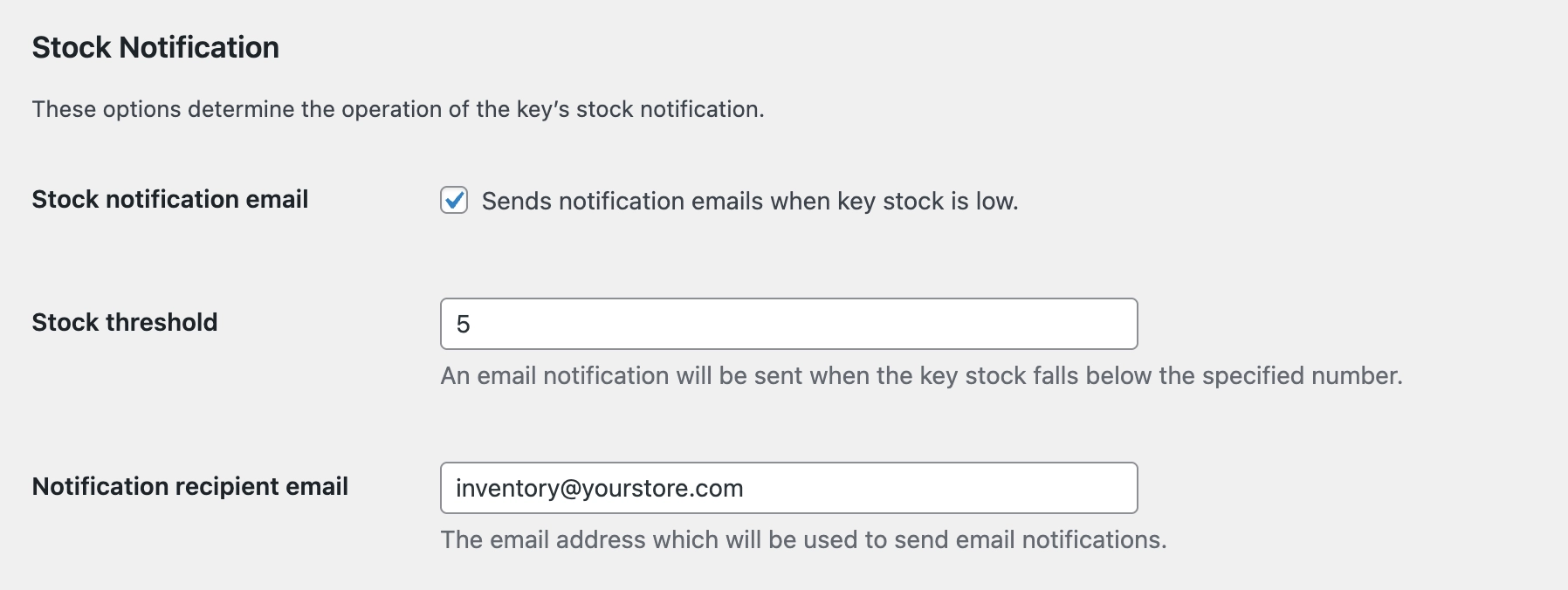
Available Options
- Stock Notification Email: Toggle this on to activate the low stock alert system. When enabled, an email is sent automatically when available keys fall below your defined threshold.
- Stock Threshold: The number of remaining keys that triggers the alert. The default is 5, meaning you will be notified when fewer than 5 keys are left for a product.
- Notification Recipient Email: The email address that receives the alert. You can enter any address, such as your own, a team inbox, or a fulfilment contact.
Example
You sell a popular antivirus product and typically keep 100 keys in stock. You set the stock threshold to 10 and the recipient email to [email protected]. When the 10th-to-last key is assigned to an order, the system automatically sends an alert to that address, giving you time to purchase and upload a new batch before stock hits zero.
The threshold applies per product, not as a global total. If you sell multiple key-based products, each product’s stock is monitored independently based on its own key count.
Recommended Threshold
A good starting point is setting the threshold to the number of keys you typically sell in one to two days. This gives you a comfortable window to restock. If you regularly sell in large volumes, consider raising the threshold accordingly.