
This guide walks you through selling your first serial key from start to finish, so you can see how the plugin works in just a few minutes.
Before You Begin
Make sure WC Serial Numbers is installed and activated on your WordPress site, and that you have at least one product created in WooCommerce.
Step 1: Add a Key to Your Store
First, you need a key in your store’s stock. Follow the steps in Add Keys Manually to create your first serial key and assign it to a product.
Step 2: Enable Key Delivery on the Product
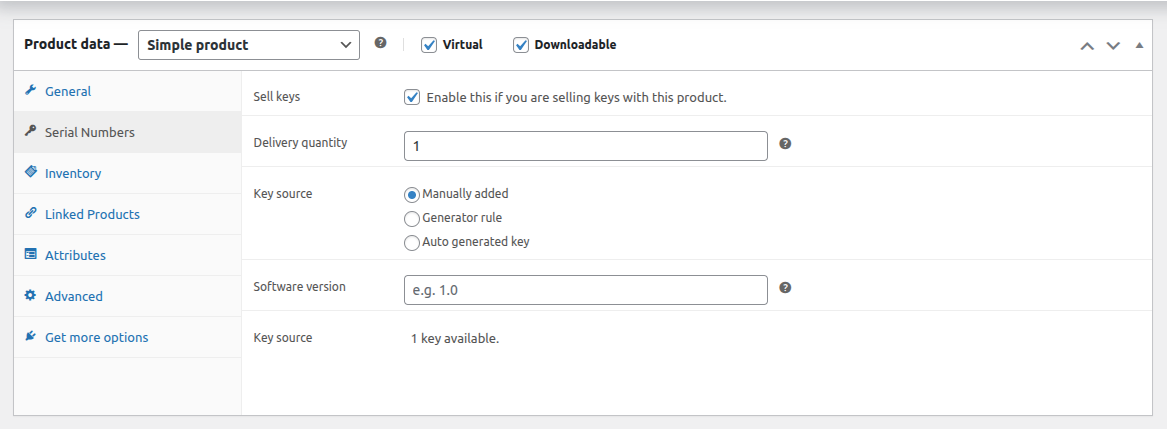
Now tell the product to deliver the key you just added.
- Go to Products in your WordPress admin menu, then edit the product you assigned the key to.
- In the Product Data section, click the Serial Numbers tab.
- Check Sell Keys to enable key delivery for the product.
- Set the Delivery Quantity to define how many keys are delivered per unit ordered.
- Set the Key Source to Manually Added.
- Click Update to save the changes.
Step 3: Place a Test Order
To confirm everything is working, place a test order for the product. Once the order is marked as complete, the key will be assigned and delivered to the customer automatically.
What Happens After Purchase
When a customer places a successful order, the key is automatically assigned and delivered. The customer can view their key on the My Account page and in the order confirmation email.