
Restrict coupons by delivery destination. Great for targeting high-demand shipping areas or running location-based campaigns.
Access Shipping Options Settings
For New Coupons: Go to Marketing > Coupons > Add New Coupon. In the Coupon Data section, click Usage Restriction and scroll to Shipping Countries, States and Postcodes.
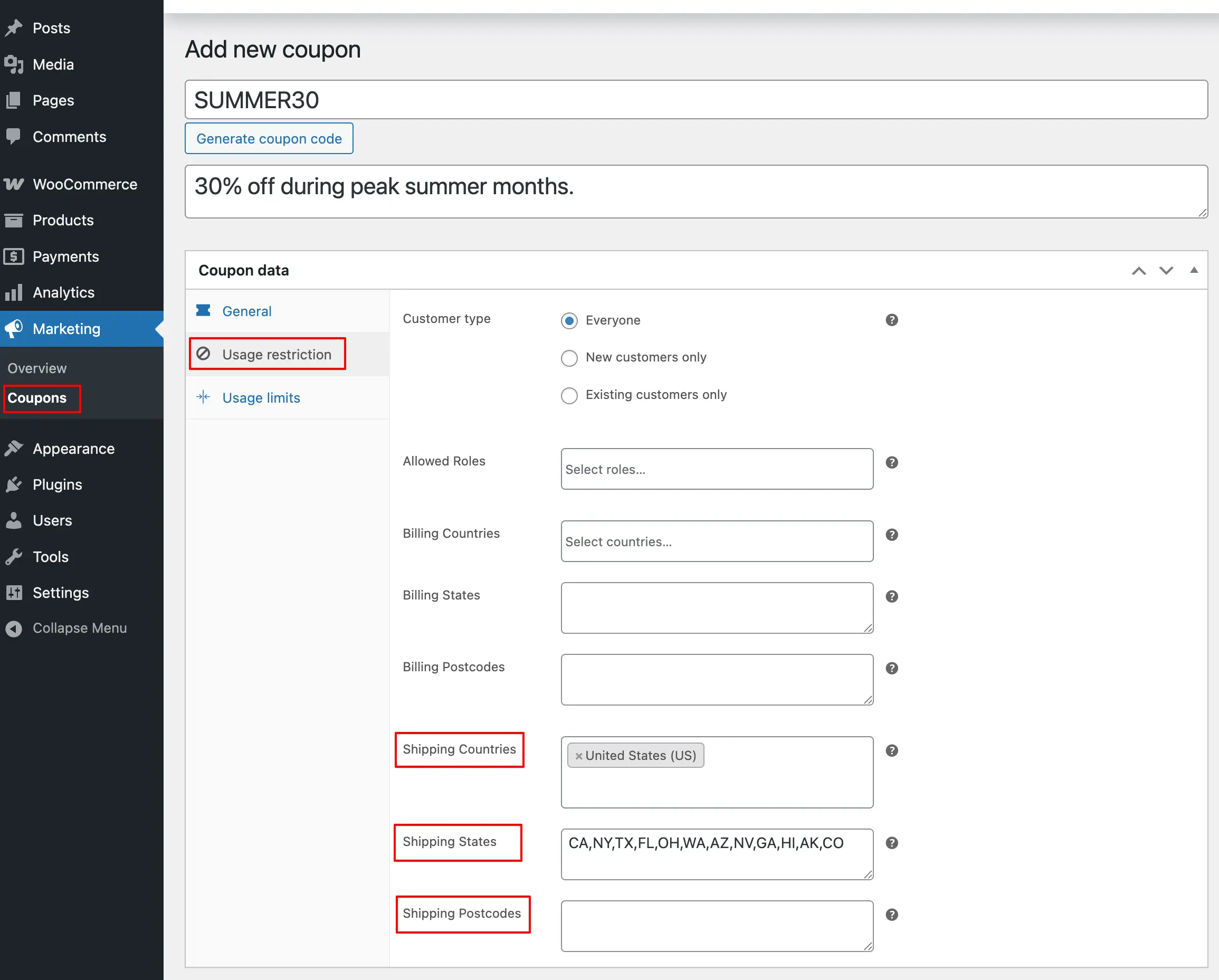
For Existing Coupons: Edit the coupon, then navigate to Usage Restriction in the Coupon Data section and scroll to Shipping Countries, States and Postcodes.
Shipping Option
Shipping Countries
Specify which destination countries qualify for this discount. Leave empty for worldwide availability.
Shipping States
Enter 2-digit state codes separated by commas. Example: CA, NY, TX
Shipping Postcodes
Add qualifying postcodes separated by commas. Example: 10001, 90210, 60601
Save Your Coupon
Click Publish for new coupons or Update for existing ones to apply shipping restrictions.
Next Step
You’ve now configured all available coupon restrictions. Review your complete coupon setup to verify everything works as intended.