
Target customers based on their billing location. Ideal for region-specific promotions or compliance with local pricing rules.
Access Billing Options Settings
For New Coupons: Go to Marketing > Coupons > Add New Coupon. In the Coupon Data section, click Usage Restriction and scroll to Billing Countries, States and Postcodes.
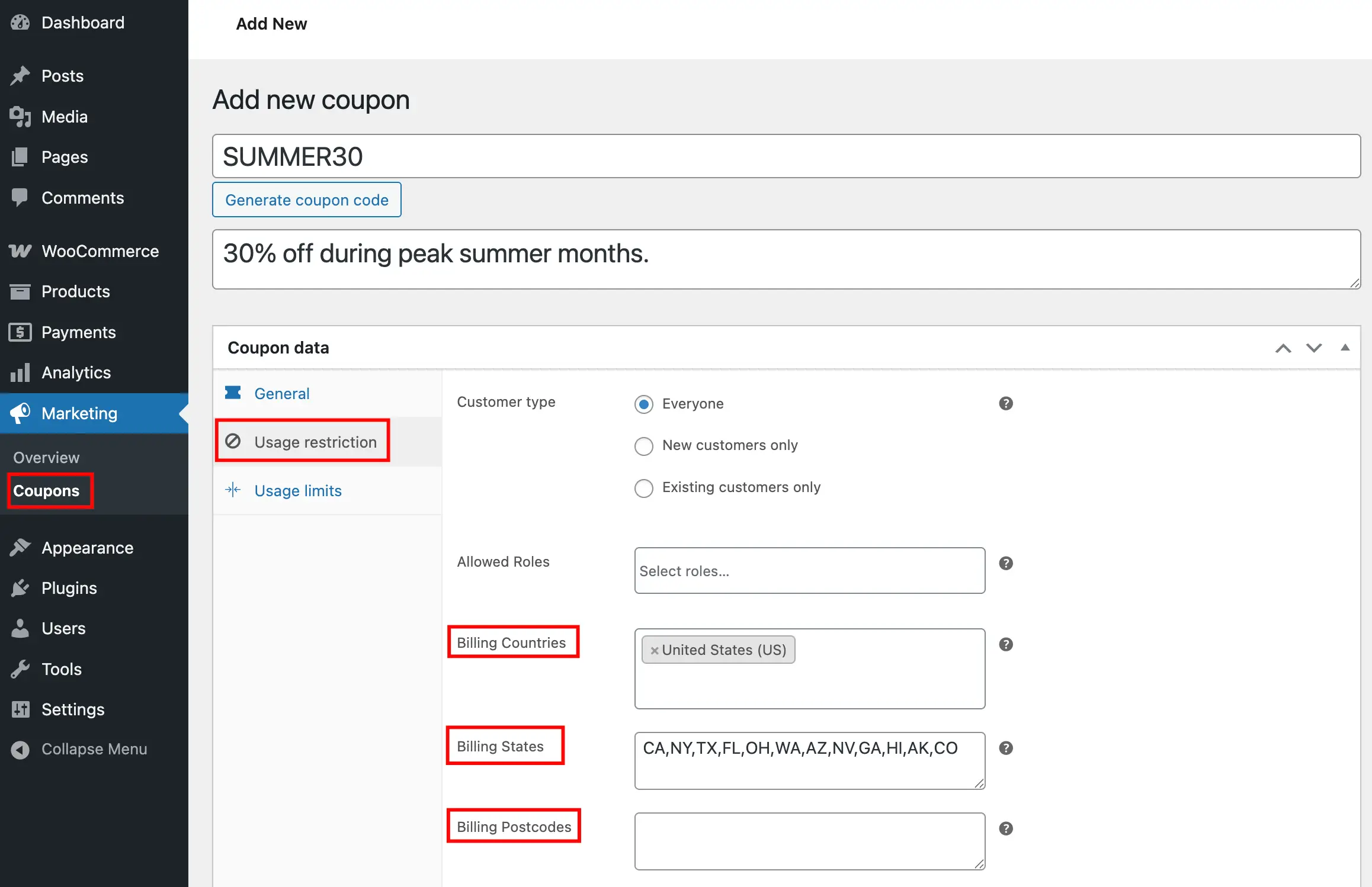
For Existing Coupons: Edit the coupon, then navigate to Usage Restriction in the Coupon Data section and scroll to Billing Countries, States and Postcodes.
Billing Options
Billing Countries
Choose which countries can apply this coupon. Leave empty to allow all countries.
Billing States
Add 2-digit state codes separated by commas. Example: CA, NY, TX
Billing Postcodes
List specific postcodes separated by commas. Example: 10001, 90210, 60601
Save Your Coupon
Click Publish for new coupons or Update for existing ones to apply billing restrictions.
Next Step
Layer additional targeting with restrictions based on shipping information to match delivery destinations.