

Configure how variation swatches appear on shop, category, and archive pages. Let customers see and select product options before clicking into individual product pages.
Access Catalog Settings
Navigate to Products > Variation Swatches in your WordPress dashboard and click the Catalog Settings tab.
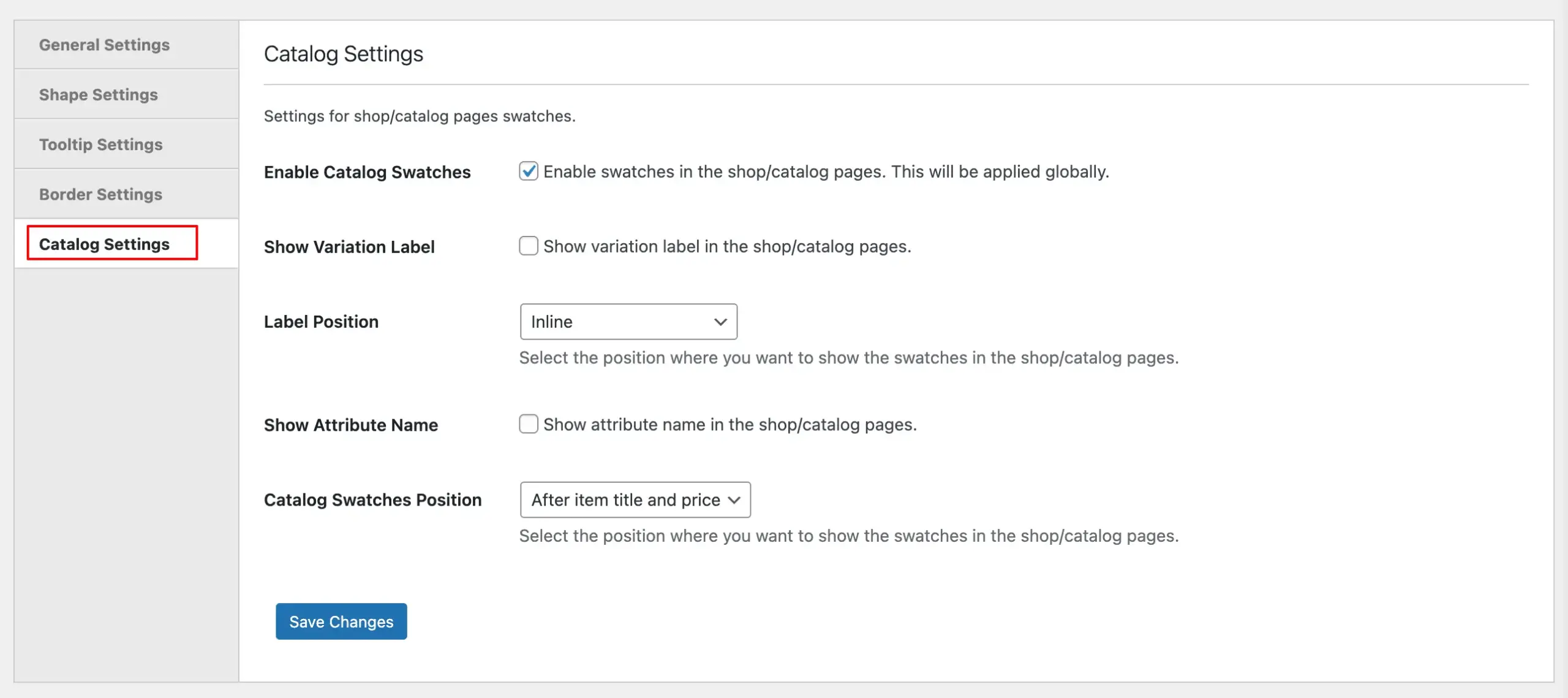
Configuration Options
Enable Catalog Swatches
Turn on swatches for shop and catalog pages store-wide. When enabled, customers can see variation options (colors, sizes, etc.) directly on product listings.
Show Variation Label
Display the selected variation label on catalog pages. Shows what option customers have chosen (e.g., “Color: Red”).
Label Position

Choose how variation labels and swatches are arranged:
- Inline – Labels and swatches appear side-by-side horizontally
- Stacked (Left align) – Labels appear above swatches, aligned to the left
- Stacked (Center align) – Labels appear above swatches, centered
Show Attribute Name
Display the attribute name (like “Color” or “Size”) alongside swatches on catalog pages. Helps customers understand what they’re selecting.
Catalog Swatches Position
Choose where swatches appear on product cards. Currently available option:
- After item title and price – Swatches display below product name and pricing
Save Changes
Click Save Changes to apply catalog settings across your shop and archive pages.