

Target specific customer segments with coupon restrictions. Control who can use your coupons based on their purchase history.
Access Customer Type Settings
For New Coupons: Go to Marketing > Coupons > Add New Coupon. In the Coupon Data section, click Usage Restriction and scroll to Customer Type.
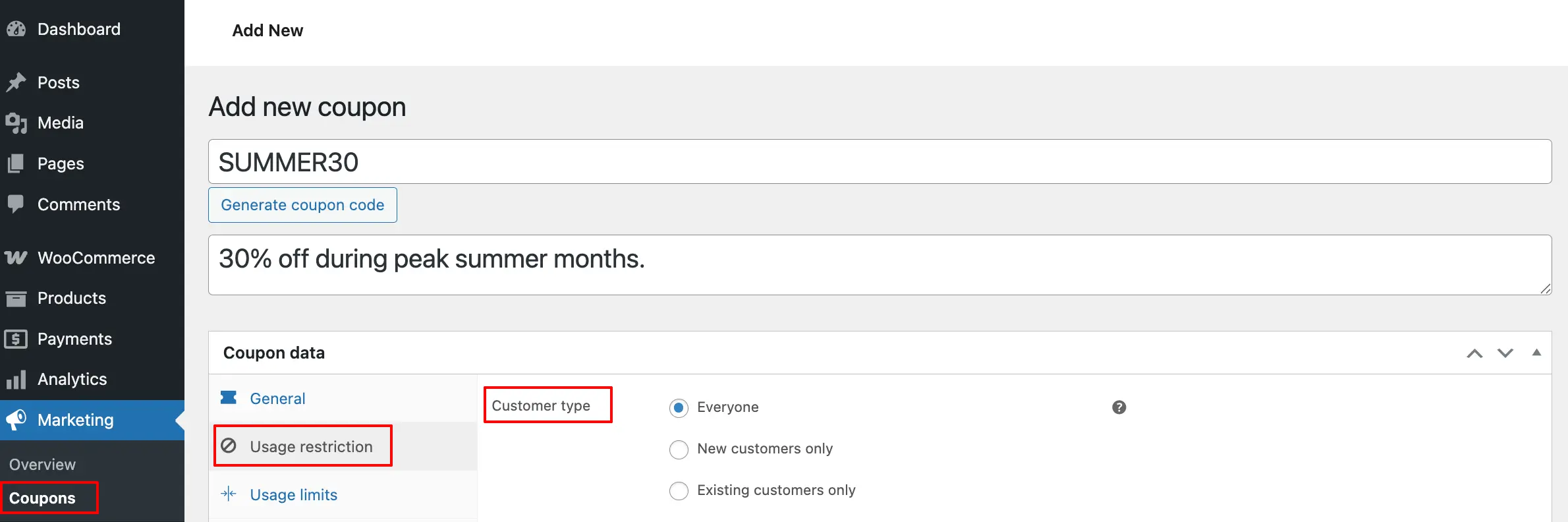
For Existing Coupons: Edit the coupon, then navigate to Usage Restriction in the Coupon Data section and scroll to Customer Type.
Customer Type Options
Everyone
Allow all customers to use this coupon regardless of their purchase history.
New Customer Only
Restrict coupon usage to first-time customers who haven’t completed any previous orders. Perfect for welcome offers and acquisition campaigns.
Existing Customer Only
Limit coupons to customers with at least one completed order. Ideal for loyalty rewards and retention strategies.
Save Your Coupon
Click Publish for new coupons or Update for existing ones to apply the customer type restriction.
Next Step
Further refine coupon access by setting restrictions based on user roles for more granular control.