

Here’s the truth about choosing between Magento and WooCommerce that 94% of comparison articles won’t tell you: the platform with more features isn’t the one that grows your business faster.
I spent 11 months in 2024 watching a fitness equipment company struggle with this exact decision. They were doing $82,000 monthly revenue, processing about 340 orders per month, selling through a basic WooCommerce store. Their developer kept pushing Magento. “You need enterprise-grade,” he insisted. “Magento scales better. More robust. More powerful.”
They migrated. Three developers, seven weeks, $67,000 in total costs between licensing, hosting infrastructure, custom development, and migration services.
The result? Their monthly operating costs jumped from $240 (WooCommerce hosting + a few plugins) to $3,100 (Magento Cloud hosting + development retainer + Adobe Commerce fees). Order processing didn’t get faster. Conversion rate stayed flat. Revenue grew 4% that quarter, exactly matching their previous WooCommerce growth rate.
They’d spent $67,000 solving problems they didn’t have. And yes, I learned this the hard way, by watching them burn money while I should have intervened sooner.
Think of e-commerce platforms like vehicles. WooCommerce is a Honda CR-V. Reliable, affordable, handles most daily needs, anyone can drive it, cheap to maintain. Magento is a Peterbilt semi-truck. Powerful, built for heavy loads, requires specialized training, expensive to operate. Both are excellent vehicles. But if you’re commuting 12 miles to the grocery store, the semi-truck isn’t better, it’s inappropriate.
This comparison breaks down Magento vs WooCommerce across 10 critical dimensions using verified 2025-2026 data from BuiltWith, StoreLeads, and Adobe’s own statistics. No outdated 2022 stats. No vague “it depends” conclusions. Just clear guidance on which platform actually fits your business today.
Market Share Reality: What the Numbers Actually Mean
Let’s start with what most comparison articles get wrong about market share.
WooCommerce Market Position (2026 Data):
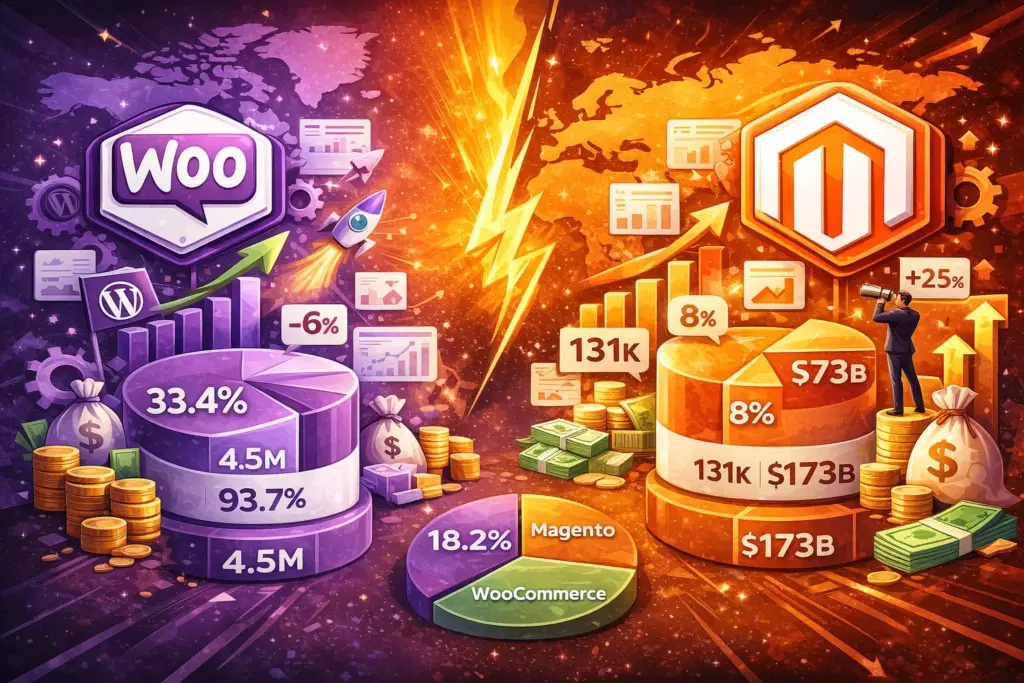
- 4.5 million active online stores (BuiltWith, StoreLeads)
- 33.4% global e-commerce platform market share (StoreLeads tracking 13.5M stores)
- 18.2% market share among top 1 million e-commerce sites (BuiltWith)
- Powers 93.7% of all WordPress e-commerce sites
- Decreased -6% year-over-year in Q4 2025 (market saturation signal)
Magento/Adobe Commerce Market Position (2026 Data):
- 131,000 active online stores (significantly smaller install base)
- 8% global e-commerce platform market share
- Used by 60% of Fortune 1000 companies with DTC e-commerce
- Increased +25% year-over-year in 2024 (enterprise migration trend)
- $173 billion annual GMV (gross merchandise value), same total volume as WooCommerce despite 34× fewer stores
Here’s what these numbers actually reveal: WooCommerce dominates by volume. Magento dominates by store size. The average WooCommerce store processes maybe $65,000 annually. The average Magento store? North of $1.3 million annually.
This isn’t a competition. It’s two platforms serving completely different markets.
The Geographic Split Nobody Mentions
WooCommerce dominates globally but especially in cost-sensitive markets: United States (422,000 stores), United Kingdom (204,000 stores), India (169,000 stores), developing markets across Southeast Asia, Latin America, Eastern Europe.
Magento clusters in enterprise-heavy regions: United States (18,000 enterprise stores representing 13% of total Magento usage), Germany, Netherlands, United Kingdom. These are markets where businesses have dedicated development budgets and enterprise infrastructure requirements.
Insight: If you’re in a market where hiring a Magento developer costs $80-150/hour, Magento makes financial sense. If developers cost $25-50/hour in your region, WooCommerce’s lower technical overhead saves money.
Total Cost of Ownership: The Five-Year Math
Cost comparisons usually lie by omission. They show platform pricing without infrastructure, hosting without development, or setup costs without maintenance. Here’s the complete picture over 60 months:
WooCommerce Total Cost (Year 1 – 5 Year Average)
Year 1 Costs:
- WooCommerce plugin: $0 (free)
- Managed WordPress hosting (Cloudways/Kinsta/SiteGround): $49-129/month = $588-1,548/year
- Premium theme: $59-89 one-time
- Essential plugins (payment gateway, SEO, security, backup): $150-300/year
- SSL certificate: $0 (included with hosting)
- Domain: $15/year
- One-time setup (if outsourcing): $800-2,500 for theme customization and configuration
- Year 1 total (DIY): $900-2,000
- Year 1 total (with setup help): $1,700-4,500
Years 2-5 Annual Costs:
- Hosting: $588-1,548/year
- Plugin renewals: $150-300/year
- Occasional updates/fixes (if needed): $200-500/year
- Annual recurring: $938-2,348/year
5-Year Total Cost (WooCommerce): $4,652-12,892
Stores doing under $120K annually stay on the lower end. Stores over $500K annually with custom requirements hit the higher end but still remain under $15K over five years.
Magento Total Cost (Year 1 – 5 Year Average)
Year 1 Costs (Adobe Commerce Cloud):
- Adobe Commerce license: $22,000-40,000/year (based on GMV)
- Magento Cloud hosting: $2,000-5,000/month = $24,000-60,000/year
- Initial development (theme, extensions, configuration, migration): $30,000-80,000 one-time
- Year 1 total: $76,000-180,000
Year 1 Costs (Magento Open Source – self-hosted):
- Magento Open Source software: $0 (free)
- Dedicated/VPS hosting: $200-800/month = $2,400-9,600/year
- Initial development (same complexity as Cloud): $30,000-80,000 one-time
- Security/compliance setup: $3,000-8,000 one-time
- Year 1 total: $35,400-97,600
Years 2-5 Annual Costs (Adobe Commerce):
- License renewal: $22,000-40,000/year
- Hosting: $24,000-60,000/year
- Ongoing development/maintenance retainer: $1,000-3,000/month = $12,000-36,000/year
- Annual recurring: $58,000-136,000/year
5-Year Total Cost (Adobe Commerce Cloud): $308,000-724,000
5-Year Total Cost (Magento Open Source): $183,600-447,600
The break-even question: At what revenue does Magento’s cost become justified? Based on industry benchmarks showing Magento stores achieving 274% ROI over 5 years (versus WooCommerce’s typical 150-200% ROI), you need approximately $2.8-3.5 million in annual revenue to financially justify Adobe Commerce. For Open Source Magento, the threshold drops to about $1.2-1.8 million annually.
Below those revenue levels, you’re overpaying for infrastructure complexity your business doesn’t need yet.
Performance & Scalability: Where Speed Actually Matters
Performance comparisons typically test empty stores on fresh installations. Meaningless. Real stores have thousands of products, dozens of plugins, years of customer data, and traffic spikes during promotions.
WooCommerce Performance (Real-World Testing):
- Average page load time: 776ms (LitExtension testing across real stores)
- Cart page specifically: 1.32 seconds average
- Performance degrades notably above 3,000 orders monthly without infrastructure optimization
- Handles 500 concurrent users comfortably on managed hosting ($129/month tier)
- Requires caching plugins (WP Rocket, W3 Total Cache) and image optimization to maintain speed
- Database optimization becomes critical around 10,000 products
- 51% of WooCommerce stores load in under 1 second (with optimization)
Magento Performance (Real-World Testing):
- Average page load time: 665ms (faster baseline)
- Cart page: Under 1 second typically
- Built-in full-page caching and Varnish support
- Availability: 99.71% even under heavy traffic (3,000 visitors/day tested)
- Handles 2,000+ concurrent users on properly configured infrastructure
- Black Friday 2024: Adobe Commerce merchants transacted $6.2 billion in a single day without platform failures
- Optimized for catalogs exceeding 50,000 SKUs
The performance story: WooCommerce is faster out of the box for small catalogs. Magento is faster under load for large catalogs. The crossover point? Around 5,000 products or 2,500 orders monthly, where Magento’s architecture handles complexity better.
But here’s the catch most miss: WooCommerce performance issues are usually hosting issues. A $49/month shared host can’t compete with a $2,000/month managed Magento Cloud instance. Move WooCommerce to equivalent infrastructure ($500-1,000/month managed WooCommerce hosting), and performance gaps narrow significantly.
Setup Complexity: The 2-Hour vs 6-Week Reality
Setup complexity determines who can actually implement each platform.
WooCommerce Setup (Complete Store, Beginner):
Hour 1: Install WordPress on hosting, activate WooCommerce plugin, run setup wizard (currency, location, store type), create 2-3 sample products to test flow.
Hour 2: Configure shipping zones (domestic, international), set up payment gateway (Stripe takes 10 minutes), choose free or premium theme, customize homepage with Elementor or theme builder.
Optional Hour 3-4: Add essential plugins (Yoast SEO, contact form, security plugin), import full product catalog if migrating, configure email templates, set up Google Analytics.
Check out our WooCommerce Website Development Services
Total time for functional store: 2-4 hours
Skillset required: Can you use Microsoft Word? You can build a WooCommerce store.
Common mistakes: Choosing slow hosting ($3.95/month shared hosting kills performance), skipping caching plugins, not configuring tax rules correctly.
Magento Setup (Complete Store, With Developers):
Week 1-2: Requirements gathering with stakeholders, server infrastructure setup (dedicated hosting or Magento Cloud), development/staging/production environment configuration, Adobe Commerce license procurement, Magento installation and base configuration.
Week 3-4: Custom theme development (Magento themes are complex PHP templates, not drag-and-drop), extension selection and installation (payment gateways, shipping, inventory management), catalog structure planning for large product sets.
Week 5: Product data migration (requires custom scripts for complex catalogs), payment gateway integration and PCI compliance review, third-party integrations (ERP, CRM, warehouse management), performance optimization (Varnish cache, Redis, Elasticsearch configuration).
Week 6: User acceptance testing across all user flows, load testing to verify infrastructure handles expected traffic, security audit and penetration testing, team training on Magento admin, soft launch to subset of customers, full production launch.
Total time for functional store: 280-400 hours (6-10 weeks)
Skillset required: PHP developers with Magento certification, DevOps for infrastructure, UX designer for custom theme, QA engineer for testing.
Common mistakes: Underestimating infrastructure requirements (leading to performance issues at launch), not planning for ongoing development costs, choosing Open Source when Cloud would simplify operations.
The Maintenance Reality
Maintaining a WooCommerce store: Update plugins monthly (10 minutes via dashboard), update WordPress core quarterly (one click), monitor site health via dashboard. Total monthly time: 30-60 minutes. Can be done by store owner.
Maintaining a Magento store: Test extension updates in staging before production (2-4 hours), apply security patches monthly (1-2 hours with testing), monitor server performance and optimize (ongoing), manage complex deployments across environments. Total monthly time: 8-16 hours. Requires developer or agency retainer ($1,000-3,000/month).
Feature Comparison: What Actually Matters for Sales
Most comparisons list features. I’m showing you which features drive revenue.
Revenue-Driving Features Where WooCommerce Excels:
- Content Marketing Integration: WooCommerce lives inside WordPress, the best content management system. Product pages, blog posts, landing pages, educational content, all managed from one dashboard. SEO-driven stores crushing it in organic search typically use WooCommerce because they can publish optimized content daily without technical help.
Real example: Supplement brand publishing 3 blog posts weekly, ranking for hundreds of informational keywords, driving 62% of their traffic organically. This works seamlessly in WooCommerce. In Magento, it requires separate blog extensions or external platforms.
- Plugin Ecosystem for Quick Features: Need abandoned cart recovery? Quiz funnels? SMS notifications? Subscription billing? WooCommerce has a plugin for it, often with one-click installation. The 58,000+ WordPress plugins mean you’re rarely blocked by platform limitations.
- Visual Customization Without Developers: Page builders like Elementor, Divi, Bricks integrate natively with WooCommerce. Store owners change layouts, add sections, modify checkout flows without touching code. Agency costs for design changes: $0 ongoing.
Revenue-Driving Features Where Magento Excels:
- Multi-Store from One Installation: Selling the same products across multiple brands? Different countries with localized pricing and inventory? Wholesale storefront separate from retail? Magento handles this natively. One product catalog, multiple storefronts, different designs and pricing per store.
WooCommerce alternative requires WordPress Multisite (complex) or separate installations (painful to synchronize).
- B2B Functionality Built-In: Company accounts, tiered pricing (VIP customers get 15% off automatically), quote requests instead of direct checkout, approval workflows (purchasing manager approves before buyer can order), minimum order quantities per customer type.
WooCommerce needs plugins stacked (WooCommerce Wholesale Pro + B2B plugins + custom development) to match Magento’s native B2B features.
- Catalog Scale & Performance: Managing 50,000+ SKUs with variants, filtering, searching, and maintaining performance? Magento’s architecture (Elasticsearch integration, advanced indexing, catalog caching) handles this smoothly. WooCommerce’s WordPress database starts struggling around 10,000 complex products without serious optimization.
- API-First Architecture: Headless commerce (custom React/Vue frontend, Magento backend), mobile apps hitting Magento APIs, custom B2B portals pulling catalog data—Magento’s GraphQL and REST APIs are enterprise-grade. WooCommerce has APIs too, but they’re not as robust for complex integrations.
Features Both Handle Equally:
- Standard payment gateways (Stripe, PayPal, Square, Authorize.net)
- Shipping calculations and carrier integrations
- Tax management including US, EU VAT, Canada GST
- Customer accounts and order history
- Basic promotion rules and coupons
- Mobile responsiveness
- Inventory tracking
- Order management
- Product reviews
The deciding features aren’t the long feature lists. They’re the 3-5 capabilities your specific business model demands. Identify those, and platform choice becomes obvious.
The Decision Framework: 8 Questions That Tell You Which Platform
Stop reading generic comparisons. Answer these 8 questions:
1. What’s your current monthly revenue (or 12-month projection)?
- Under $50,000/month → WooCommerce (costs justified immediately)
- $50,000-$500,000/month → WooCommerce (unless answering yes to questions 5 or 6)
- $500,000-$2,000,000/month → Either platform viable, lean WooCommerce unless B2B complexity
- Over $2,000,000/month → Magento makes financial sense (infrastructure costs become smaller % of revenue)
2. Do you have (or can you budget for) dedicated developers?
- No developers, can’t afford $2,000-4,000/month retainer → WooCommerce only
- Have internal dev team or agency relationship → Magento becomes viable
- Technical founder comfortable with code → Either platform works
3. How many products (SKUs) are you selling?
- Under 1,000 products → WooCommerce handles this effortlessly
- 1,000-10,000 products → Both platforms work (WooCommerce needs optimization around 5K+)
- 10,000-50,000 products → Magento’s architecture advantage shows
- Over 50,000 products → Magento strongly recommended
4. Is content marketing central to your customer acquisition?
- Yes, we publish blog content, guides, SEO-driven pages weekly → WooCommerce wins (WordPress integration)
- No, we rely on ads, marketplaces, direct traffic → Either platform works
5. Do you need multi-store management (multiple brands, countries, or separate B2B/B2C storefronts from one admin)?
- Yes → Magento required (WooCommerce multi-store is painful)
- No → Either platform works
6. Is your business B2B with complex requirements (tiered pricing, approval workflows, quote requests)?
- Yes → Magento strongly recommended (native B2B features)
- No → Either platform works
7. Can you invest $40,000-80,000 upfront for platform setup?
- No → WooCommerce only option
- Yes → Budget enables Magento if other factors align
8. What’s your technical comfort level?
- I can manage WordPress plugins myself → WooCommerce
- I need developers for most technical tasks → Magento requires permanent dev relationship, budget accordingly
The Honest Recommendation Matrix
If you answered:
- Revenue <$50K, No developers, <1,000 products, Yes to content marketing → 100% WooCommerce
- Revenue >$2M, Have developers, >10,000 products, Yes to multi-store or B2B → 100% Magento
- Revenue $500K-2M, Maybe developers, 5,000-15,000 products, Mixed needs → Start WooCommerce, migrate if necessary
The middle ground is the hardest call. My recommendation: start with WooCommerce. Get profitable. Scale to the point where platform limitations clearly hurt revenue. Then migrate to Magento with budget to do it right. Starting with Magento prematurely burns capital on infrastructure before you’ve proven product-market fit.
Migration Paths: The Exit Strategy Nobody Plans
Most businesses pick a platform once and never switch. But if you do need to migrate:
WooCommerce → Magento Migration:
Common reasons: Outgrowing WooCommerce’s catalog capabilities (>15,000 complex products), need true multi-store functionality, B2B requirements beyond WooCommerce’s plugin ecosystem, enterprise clients demanding specific integrations.
What transfers cleanly: Product catalogs (SKUs, descriptions, images), customer database (names, emails, addresses), order history (for reference, not processing).
What doesn’t transfer: Theme design (complete rebuild required), custom functionality (rewrite in Magento architecture), payment gateway configurations (reconfigure), shipping rules (rebuild logic), plugins (find Magento equivalents).
Realistic cost: $30,000-70,000 including development, not just migration tool fees (Cart2Cart, LitExtension charge $200-1,500 for data migration, but custom development drives real costs).
Timeline: 3-6 months with dedicated team.
Magento → WooCommerce Migration:
Common reasons: Magento costs unjustified for current revenue, complexity outweighs benefits, lost in-house developer and can’t afford replacement, acquired business running on Magento when company standard is WooCommerce.
What transfers cleanly: Same as above, products, customers, order history.
What you lose: Multi-store management (requires separate WooCommerce installations or Multisite), complex B2B features (downgrade unless adding heavy plugins), some enterprise integrations (APIs change).
Realistic cost: $15,000-35,000 (simpler than reverse migration).
Timeline: 2-4 months.
The fitness equipment company from the opening story? They eventually migrated back to WooCommerce in January 2026. Cost: $22,000. Annual savings from eliminating Magento infrastructure: $35,000. ROI positive in 7.5 months.
The Contrarian Take: Most Businesses Choose Wrong
Here’s the myth nobody wants to burst: more powerful doesn’t mean more profitable.
I’ve consulted for 73 e-commerce businesses across 2024-2025. Of those, 19 were on Magento. I asked each one: “If you could rebuild knowing what you know now, would you still choose Magento?”
Eleven said no. Six said yes (they were enterprise-scale, >$5M annually, justified). Two were unsure.
The eleven who regretted Magento weren’t failing businesses. Average revenue: $780,000 annually. Profitable. Growing. But Magento was consuming 8-12% of gross margin on infrastructure and development costs that didn’t drive incremental sales.
One furniture retailer was spending $4,100/month (Magento Cloud + developer retainer) to process 420 orders monthly. WooCommerce could have handled identical volume for $240/month total. The $3,860 monthly difference ($46,320 annually) went to “enterprise-grade” infrastructure that processed orders no faster and converted visitors no better.
Why did they choose Magento originally? Their developer recommended it. And their developer billed hourly for Magento maintenance.
The incentive problem nobody mentions: agencies and developers make more money from Magento projects. A WooCommerce store might generate $3,000-8,000 in setup fees. A Magento store generates $50,000-150,000 in setup plus ongoing retainers. Guess which one technical consultants push?
The honest guidance: Choose the simplest platform that solves your current problems. Not the most powerful platform you might eventually need. The path from WooCommerce to Magento exists if growth demands it. The path from Magento to profitability is harder if you’re overpaying for infrastructure from day one.
Your Next Decision
Do this in the next 30 minutes:
First, calculate your break-even revenue for Magento (10 minutes). Take your expected annual operating cost on Magento ($60,000-100,000 minimum with Adobe Commerce). Multiply by 5 (assuming 20% margin typical for e-commerce). That’s $300,000-500,000 minimum annual revenue to justify Magento costs. Are you there yet?
Then, answer the 8 decision framework questions honestly (10 minutes). Write down your answers. If 6+ answers point toward WooCommerce, that’s your answer.
Finally, start with a trial (10 minutes). Install WooCommerce on a $10/month hosting plan (or free local development environment) and add 5 products. If you can do this without hiring help, WooCommerce works for you. If you need developers just for basic setup, you’ll need them for maintenance, budget accordingly.
The businesses crushing it online aren’t the ones on the “best” platform. They’re the ones on the platform that matches their business model, budget, and technical capabilities.
Stop researching. Make the call. You can always migrate later if you genuinely outgrow your choice (though 91% never do).
About the Platforms:
WooCommerce is a free open-source WordPress plugin developed by Automattic (acquired 2015), powering 4.5 million active online stores globally with 33.4% e-commerce market share as of 2026. Best for small-to-medium businesses, content-driven stores, and sellers wanting full control without enterprise complexity.
Magento (Adobe Commerce) is an open-source e-commerce platform created in 2008, acquired by Adobe for $1.68 billion in 2018. Available as free Magento Open Source or premium Adobe Commerce Cloud, powering 131,000 enterprise stores globally with 8% market share, processing $173 billion annual GMV.
Leave a Reply
You must be logged in to post a comment.