
Set up the foundation for your customer-based coupons. These settings control discount structure, validity period, and usage rules across your store.
Access the plugin settings via WordPress Dashboard > Marketing > Customer Based Coupon.
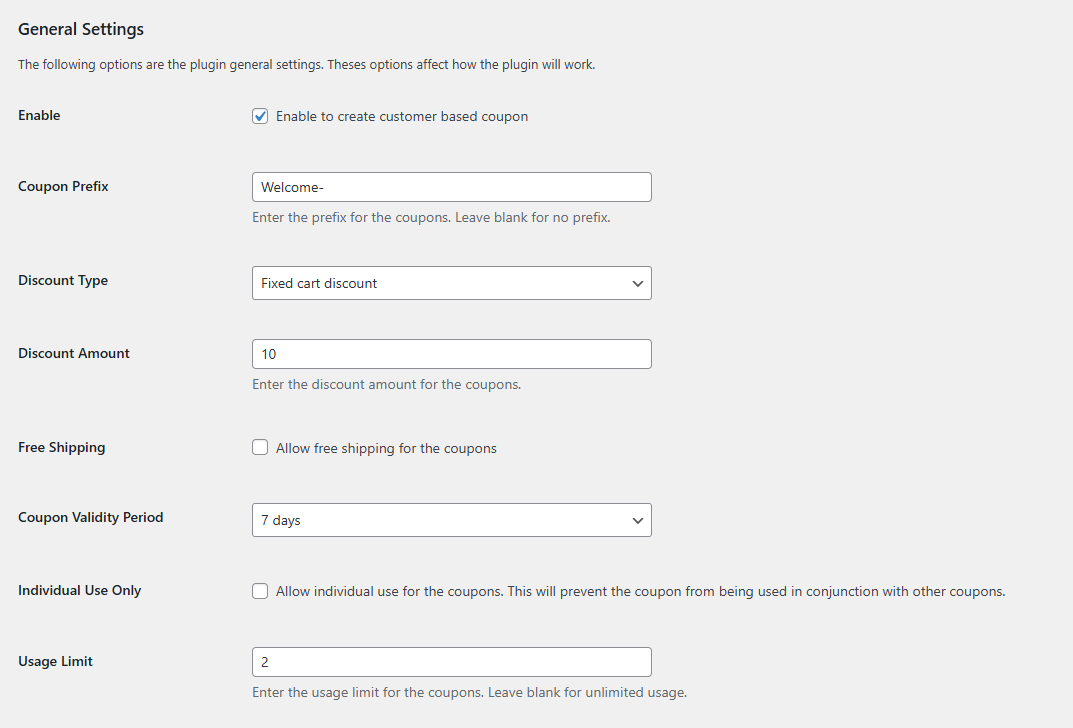
Step 1: Enable the Plugin
Enable Customer Based Coupon
Toggle this to activate automatic coupon generation store-wide. When disabled, no new coupons are generated, but existing ones remain valid.
Step 2: Configure Coupon Branding
Coupon Prefix
Add a custom prefix to all generated coupon codes for better organization and brand recognition. (e.g., Setting “WELCOME-” creates codes like WELCOME-A7X9B2)
Step 3: Set Your Discount Structure
Discount Type
Choose the structure of the discount applied by the coupon.
Options are:
- Fixed Cart Discount – Subtracts an amount from cart total.
- Percentage Discount – Reduces cart total by a percentage.
- Fixed Product Discount – Applies discount to specific products.
Discount Amount
Enter your discount value based on type selected. Use numeric amounts for all cases.
Step 4: Additional Coupon Features
Allow Free Shipping
Include free shipping with coupons to boost conversions and reduce cart abandonment from shipping costs.
Coupon Validity Period
Set how many days coupons remain active after issuance. Shorter periods create more urgency for purchases.
Step 5: Usage Restrictions
Restrict to Individual Use
Prevent customers from combining these coupons with other discount codes. This protects your profit margins and prevents coupon stacking.
Usage Limit Per Coupon
Define how many times each coupon can be redeemed. Most stores use 1 to prevent abuse. Set to unlimited only for ongoing loyalty programs.
Step 6: Customize the Customer Interface
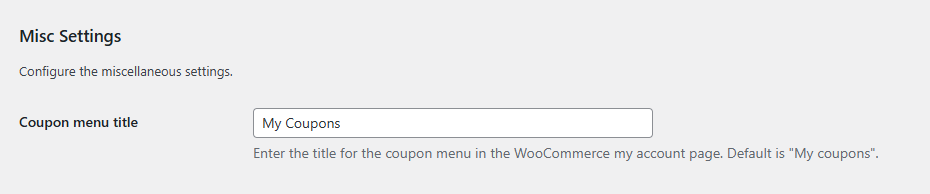
Coupon Menu Title
Customize the label in the customer’s My Account menu where they access their coupons. (e.g., “My Coupon”, “Exclusive Coupon”)
Save Changes
Click Save Changes to apply your basic coupon configuration.
Next Step
After setting up basic configuration, proceed to Coupon Generation Settings to define when coupons are automatically created for customers.