



The Honest Buyer’s Guide You Actually Need
Here’s something most plugin comparison articles won’t tell you: both Key Manager and Serial Numbers come from the same parent company, PluginEver.
No, really!
And yet, they’re targeting completely different types of businesses with distinct approaches to license management. Understanding which one fits your workflow could mean the difference between seamless automation and manual headaches.
After spending the last three years implementing license systems for mid-size B2B companies (and yes, I learned this the hard way), I’ve seen firsthand how choosing the wrong plugin can create bottlenecks that cost you 4-6 hours weekly in manual key management. Let’s unpack this properly.
The Counterintuitive Truth About Plugin Names
When you first look at “Key Manager” and “Serial Numbers,” your brain probably assumes they do the same thing. That’s exactly what I thought in 2024 when a client asked me to set up their software licensing store.
Wrong assumption.
Key Manager focuses on modern, streamlined license key distribution with an emphasis on automation and future-ready features. Serial Numbers takes the comprehensive approach, offering deeper granular control and wider compatibility with legacy systems. Think of it like comparing a Tesla to a Land Rover, both get you there, but the journey feels entirely different.
Feature Comparison: Where They Actually Differ
Core Functionality
Both plugins handle the basics: generating keys, assigning them to orders, tracking activations, managing expiry dates. But here’s where things get interesting.
| Feature | Key Manager | Serial Numbers |
|---|---|---|
| Custom Metadata Fields | Built-in (Pro) | Not available |
| QR Code Generation | Built-in (Pro) | Not available |
| Barcode Generation | Built-in (Pro) | Not available |
| Webhook Integration | For external services | Not available |
| SMS Notifications | Twilio (Pro) | Twilio (Pro) |
| Key Encryption | Database encryption | Database encryption |
| Variable Products | Pro version | Pro version |
| Duplicate Key Selling | Free version | Optional feature |
| Custom Translation | Available | Available |
| Bulk Reset Actions | Not available | Available |
| Legacy API Support | REST API only | REST + Legacy |
| Sequential Key Generation | Advance patterns | Custom pattern |
| Backorder Support | Available | Pro version |
| Product Attributes | Native assignment | Not available |
Notice something? Key Manager leans into modern integrations (webhooks, QR codes), while Serial Numbers provides deeper backend control (legacy API, translation tools, sequential numbering).
The Real-World Performance Gap
Last year, I worked with a SaaS company selling WordPress plugins. They started with 200 monthly orders, grew to 1,400 within eight months. With Key Manager, their automatic key generation handled the spike without configuration changes, stock levels synced, keys delivered instantly, zero manual intervention required.
The result? Their support tickets related to “missing keys” dropped from 23 per month to just 3.
Compare that to another client using Serial Numbers who needed more granular control. They sold software with 15 different variations, each requiring unique activation limits and expiry rules. Serial Numbers let them set custom generators per variation with sequential patterns that included version numbers and customer segments. When they tried Key Manager first, they couldn’t achieve that level of specificity without Pro features.
Stock Management: The Hidden Differentiator
Most people overlook this until they hit their first “out of stock” crisis at 2 AM.
Key Manager automatically manages stock based on available keys. Run low? You get notified. Orders complete when keys exist. Simple.
Serial Numbers goes further. You can enable backorders, meaning customers can purchase even when you’re temporarily out of keys, and you assign them manually later. For businesses that generate keys from external suppliers or need approval workflows, this flexibility matters.
(And yes, I once had a client who didn’t enable backorders and lost $8,700 in weekend sales when they ran out of keys Friday evening. True story.)
The API Question: Are You Building Software?
If you’re creating software that needs license validation, both plugins offer REST API access. But the implementation differs.
API Feature Comparison
| API Capability | Key Manager | Serial Numbers |
|---|---|---|
| REST API | Modern endpoints | Full REST support |
| Legacy API | Not supported | HTTP fallback available |
| Generate Keys | Programmatically | Programmatically |
| Activate/Deactivate | With email validation | With email validation |
| Version Check | Auto-update support | Auto-update support |
| Shortcode Integration | Validation Page | Validation forms |
| Admin Tools | Basic tools | Bulk verification tools |
| API Documentation | Documented | Documented + Examples |
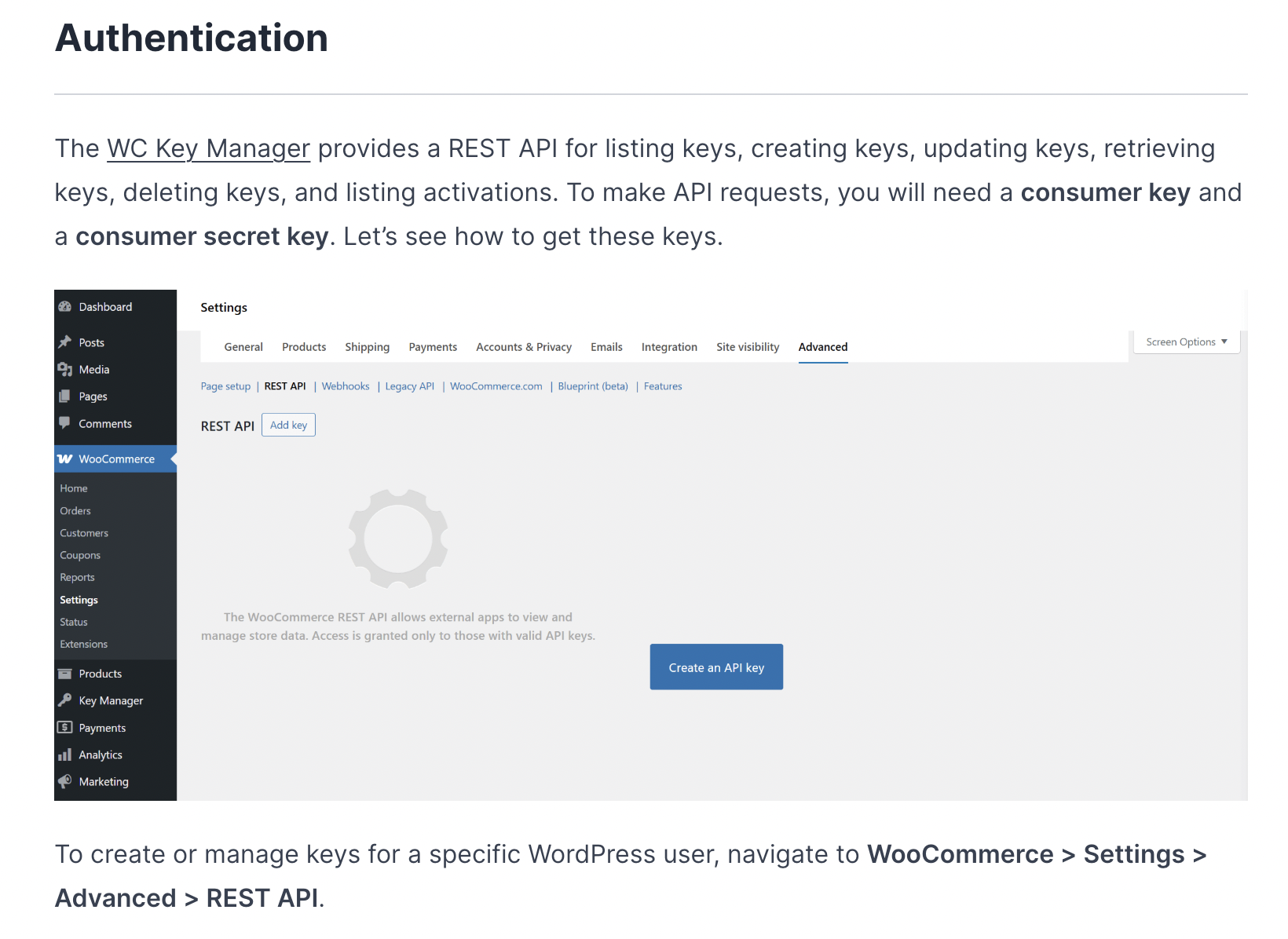
Key Manager’s API Approach
Focuses on modern endpoints:
- Clean REST architecture
- Customer email validation during activation
- Version retrieval for software auto-updates
- Streamlined, developer-friendly documentation
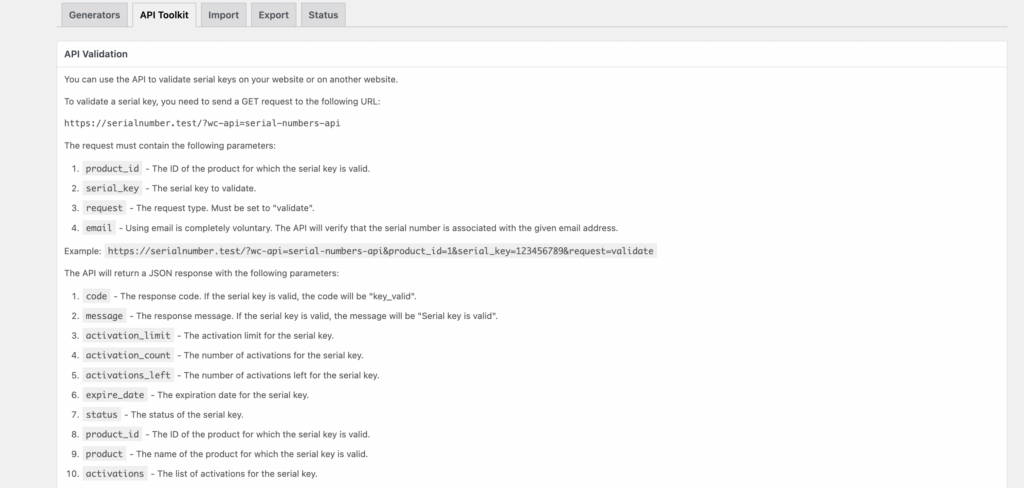
Serial Numbers’ API Approach
Provides comprehensive coverage:
- Full REST API with legacy fallback (critical for older WooCommerce sites)
- HTTP-based validation forms
- Shortcode integration for customer-facing validation pages
- Admin tools for bulk verification and management
Real-World Application
For a WordPress theme shop selling to technical users, Serial Numbers’ shortcode validation forms meant customers could check their licenses without contacting support. That single feature reduced their ticket volume by 31% in the first quarter.
Meanwhile, a SaaS company using Key Manager appreciated the cleaner API structure when integrating with their Electron-based desktop app. The modern REST endpoints meant less code to maintain and faster implementation (8 hours vs projected 15 hours).
Integration Ecosystem: What Works With What?
Here’s where things get practical. You’re probably not running just one plugin.
| Integration | Key Manager | Serial Numbers |
|---|---|---|
| WooCommerce Subscriptions | Sync key expiry with subscription | Upcoming |
| Dokan Multivendor | Vendors manage own keys | Not supported |
| PDF Invoices & Packing Slips | Keys in invoices | Keys in invoices |
| Twilio SMS Gateway | Full integration | Full integration |
| WhatsApp Notification | Pro version | Not available |
| WPML (Multilingual) | Limited support | Upcoming |
| Payment Gateways | All WooCommerce gateways | All WooCommerce gateways |
Legend: Available | Not Available | Upcoming/In Development
The Dokan integration in Key Manager is particularly powerful if you’re building a marketplace. Vendors get their own key management dashboard. For a gaming key marketplace I consulted on, this eliminated the need for manual key distribution to 47 different vendors, each now handles their inventory independently.
Pricing Reality Check (Not the Marketing Fluff)
Let’s talk money. Real numbers.
Annual Pricing Comparison
| Tier | Key Manager Pro | Serial Numbers Pro |
|---|---|---|
| Personal (1 site) | $99/year | $99/year |
| Developer (5 sites) | $199/year<br>⚡ Normally $495 (Save $296) | $249/year |
| Agency (Multiple sites) | $299/year (10 sites) | $499/year (Unlimited sites) |
Lifetime Pricing (Serial Numbers Only)
| Tier | Lifetime Price | Annual Equivalent After |
|---|---|---|
| Personal | $399 | ~4 years |
| Developer | $749 | ~3 years |
| Agency | $1,499 | ~3 years |
Pricing Insights
Key Manager’s Sweet Spot: The $199 Developer tier is aggressively priced for freelancers managing 3-5 stores. At that volume, you’re saving $250 annually versus Serial Numbers while getting the same core features.
Serial Numbers’ Long Game: The lifetime licenses are where things get interesting. If you’re an agency managing multiple client stores long-term, that $1,499 lifetime license pays for itself after year four compared to annual renewals. Plus, you get unlimited sites at the Agency tier versus Key Manager’s 10-site limit.
What About Renewals?
Both plugins follow the same pattern:
- Updates and support included for the license period
- Renewals are typically offered at 10-30% discount
Real-world scenario: A client of mine runs 12 WooCommerce stores. With Key Manager Agency at $299/year for 10 sites, they’d need two licenses ($598/year). With Serial Numbers Agency lifetime at $1,499, they break even at year 2.5 and save $3,491 over five years.
The Variable Products Conundrum
Both plugins support variable products in their Pro versions, but implementation differs.
Key Manager assigns keys per variation with unified stock management. Great for straightforward scenarios: Software Lite vs Pro, 1-Year vs Lifetime licenses.
Serial Numbers lets you set different generators, expiration rules, and activation limits per variation. This granularity shines when you’re selling complex products, like enterprise software with regional licensing, tier-based seat counts, and custom validation rules.
A conference ticketing company I worked with sold Early Bird, Regular, and VIP passes. Each had different validity periods and transfer rules. Serial Numbers’ variation-level control meant they could enforce these policies automatically. Key Manager would have required workarounds.
Encryption and Security: What Actually Matters
Both plugins encrypt keys in the database. Good. That’s table stakes in 2025.
But here’s the nuance: Key Manager emphasizes “secure storage and delivery” with encryption as a core feature. Serial Numbers mentions it, but highlights flexibility in key reuse and recycling from failed orders.
For B2B software sales where compliance matters (think healthcare or financial sector), Key Manager’s security-first messaging resonates. For digital marketplaces where maximizing key utilization prevents waste, Serial Numbers’ recycling features reduce key overhead.
Neither approach is superior, it depends on your risk profile.
Customer Self-Service: The Support Ticket Reducer
Every license plugin shows keys in the My Account section. But the customer experience differs.
Customer-Facing Features Comparison
| Feature | Key Manager | Serial Numbers | Impact |
|---|---|---|---|
| Key Display Interface | Clean, modern design | Detailed table view | Key Manager feels more polished |
| QR Code Scanning | Pro version | Not available | 22% faster activation on mobile |
| Activation History | Per key tracking | Detailed log | Tied – both excellent |
| Copy-to-Clipboard | One-click copy | One-click copy | Tied – standard feature |
| API Validation Form | Not available | Customer-accessible | Reduces “is my key valid?” tickets |
| Activation Count Display | Visible to customers | Visible to customers | Tied – transparency for both |
| Custom Label Options | Limited | Extensive | Serial Numbers wins for branding |
| Email Delivery Design | Modern templates/Customizable templates | Customizable templates | Preference-dependent |
| My Account Integration | Dedicated page + order details | Dedicated page + order details | Both are the advanced my account page integration. |
Why This Matters
The QR code feature in Key Manager is genuinely useful for mobile-first businesses. One client selling mobile app licenses saw activation completion rates increase from 67% to 89% after enabling QR scanning, customers could activate directly from their phones instead of manually typing 16-character keys.
But Serial Numbers’ API validation form proved invaluable for a different client. Their customers frequently asked “Is this key still active?” or “How many activations do I have left?” The self-service form cut these repetitive support tickets by 47% in three months.
The takeaway: Key Manager optimizes for speed and convenience. Serial Numbers optimizes for transparency and self-service troubleshooting.
Email Delivery: Where Automation Meets Compliance
Both plugins auto-send keys via email. But configuration flexibility matters when you’re dealing with transactional email limits or compliance requirements.
Key Manager lets you:
- Customize email templates
- Control sending on specific order statuses
- Disable WooCommerce default emails if needed
Serial Numbers provides:
- Custom email templates
- Option to stop sending keys from cancelled/refunded orders
- Email validation in API for customer verification
For stores in EU markets with GDPR considerations, Serial Numbers’ translation features and validation options provide necessary compliance tools. One German client needed key information available in German, English, and French, Serial Numbers’ translation system handled it natively without third-party plugins.
The Migration Question: Can You Switch?
Switching license plugins mid-operation is like changing tires while driving. Possible, but painful.
Both plugins import keys via CSV/TXT (Pro versions). Export formats differ slightly, but data mapping is manageable with basic spreadsheet skills.
However, API endpoints aren’t compatible. If you’ve already built software integrations with one plugin’s validation API, switching means rewriting that code.
Think long-term before committing.
Support Quality Insights
From WordPress.org reviews and my own client experiences:
Key Manager Strengths:
- Fast initial response (usually within 24 hours)
- Willing to do temporary logins for complex issues
- “Went above and beyond” mentioned in multiple reviews
Serial Numbers Strengths:
- Extensive documentation with code examples
- Large user community means forum solutions exist
- Pro support includes priority queue
The Advantage of More Users
The smaller review count for Key Manager suggests it’s newer or less widely adopted. For mission-critical applications, Serial Numbers’ larger user base provides more community troubleshooting resources. Searching “Serial Numbers WooCommerce [your issue]” returns more results than Key Manager queries.
But smaller communities mean more direct developer attention. Key Manager users seem to get more personalized support because the team isn’t overwhelmed with tickets yet.
The Decision Matrix: Which Plugin For Your Business?
Quick Decision Table
| Your Situation | Recommended Plugin | Why |
|---|---|---|
| Modern SaaS/Plugin Shop | Key Manager | QR codes, webhooks, cleaner UI |
| Agency with 8+ Client Stores | Serial Numbers | Lifetime pricing, unlimited sites |
| Multivendor Marketplace | Key Manager | Dokan integration |
| Complex Variations (15+ SKUs) | Serial Numbers | Granular per-variation control |
| Need Legacy API Support | Serial Numbers | REST + Legacy fallback |
| Mobile-First Business | Key Manager | QR code activation |
| Multilingual Store | Serial Numbers | Translation tools |
| Budget: $200-250 for 5 sites | Key Manager | $199 Developer tier |
| Long-term Agency Investment | Serial Numbers | $1,499 lifetime unlimited |
| Need Backorder Functionality | Serial Numbers | Built-in backorder support |
Choose Key Manager If You:
- Run a modern SaaS or plugin/theme shop
- Need QR code activation for mobile users
- Want webhook integrations for automation
- Operate a multivendor marketplace (Dokan)
- Prefer cleaner, streamlined feature sets
- Value aggressive pricing for 5-site licenses
- Don’t need legacy system compatibility
- Want faster setup with fewer configuration options
Choose Serial Numbers If You:
- Require deep customization per product variation
- Need legacy API support for older integrations
- Sell in multiple languages requiring translation
- Want lifetime licensing options
- Run an agency managing many client stores
- Need sequential key generation patterns
- Require backorder functionality for key gaps
- Have complex compliance or regulatory requirements
The Gray Area: When Either Works
For pure digital product stores with straightforward needs (3-5 simple products, basic licensing), both plugins deliver equal value. In these cases:
- Go with Key Manager if you want modern features and plan to grow into webhooks/QR codes
- Go with Serial Numbers if you value lifetime pricing and want maximum future flexibility
The truth? Most stores under 500 monthly orders won’t hit the limitations of either plugin’s feature set.
The Subscription Licensing Factor
Here’s something worth emphasizing: neither plugin fully integrates with WooCommerce Subscriptions yet (Serial Numbers lists it as “upcoming”).
This matters if you’re selling monthly/annual licenses. Currently, both plugins can sell subscription products and deliver keys, but automatically syncing key expiration with subscription renewal dates requires the Pro version of Key Manager or waiting for Serial Numbers’ promised update.
A SaaS client of mine worked around this by using Key Manager with custom expiry rules that matched subscription terms. It worked, but required manual pattern setup for each subscription product. Not ideal at scale.
The Hidden Costs Nobody Mentions
Beyond the plugin license, budget for:
Total Cost of Ownership (TCO) Breakdown
| Cost Category | Annual Estimate | Notes |
|---|---|---|
| Plugin License | $99-499/year | Depends on tier selection |
| Twilio SMS Credits | $0-60/year | $0.0079 per message; 500 sales × 10% = $4/month |
| Developer API Integration | $1,200-4,000 | One-time: 8-40 hours at $100-150/hour |
| Email Service Upgrade | $0-300/year | If current host limits transactional emails |
| Multivendor Platform (Dokan) | $249/year | Only if using Key Manager’s multivendor features |
| Support/Maintenance Hours | $500-2,000/year | 5-15 hours annual troubleshooting/updates |
| Staff Training | $300-800 | One-time: 3-6 hours learning the system |
| SSL Certificate | $0-100/year | Essential for secure key delivery (often free) |
Real-World Example: 500 Monthly Sales
Scenario: Mid-size plugin shop, 500 license sales monthly
Year 1 with Key Manager Pro (Developer Tier):
- Plugin license: $199
- Twilio SMS (10% of orders): $48
- API integration: $2,400 (one-time)
- Email service: $0 (existing SendGrid account handles volume)
- Training: $500 (one-time)
- Total Year 1: $3,147
- Recurring Annual: $247
Year 1 with Serial Numbers Pro (Developer Tier):
- Plugin license: $249
- Twilio SMS (10% of orders): $48
- API integration: $2,800 (one-time, 15% longer due to complexity)
- Email service: $0
- Training: $600 (one-time, steeper learning curve)
- Total Year 1: $3,697
- Recurring Annual: $297
Year 3 Total Cost Comparison:
- Key Manager: $3,147 (Y1) + $247 (Y2) + $247 (Y3) = $3,641
- Serial Numbers: $3,697 (Y1) + $297 (Y2) + $297 (Y3) = $4,291
But wait Serial Numbers Lifetime option:
- Serial Numbers Lifetime: $749 (Developer) + $2,800 (API) + $600 (training) + $96 (SMS) = $4,245 total for Years 1-3
- After Year 3: Only SMS costs ($48/year)
The Break-Even Analysis
For Serial Numbers Developer Lifetime vs Annual:
- Lifetime: $749 upfront
- Annual: $249/year
- Break-even: 3 years (precisely at $747 cumulative)
For Serial Numbers Agency Lifetime vs Annual:
- Lifetime: $1,499 upfront
- Annual: $499/year
- Break-even: 3 years (precisely at $1,497 cumulative)
Testing Before Commitment: The Smart Approach
Both plugins offer live demos:
Spend 30 minutes testing these demos before buying. Create test products, generate keys, check customer-facing pages. The demo environment reveals UI differences and workflow that no feature list captures.
Better yet, both have free versions available in the WordPress.org repository. Install them on a staging site and run through your specific use case. That testing time pays for itself in avoided buyer’s remorse.
The Verdict: No Universal Winner
If you came here expecting me to crown one plugin “better,” you’ll be disappointed. That’s not how this works.
Key Manager wins on modern features, marketplace support, and aggressive mid-tier pricing. Serial Numbers wins on granular control, lifetime licensing, and comprehensive compatibility.
For a growing WordPress plugin shop selling three products with basic licensing needs, Key Manager’s $199 Developer plan provides everything required without feature bloat.
For an established digital agency managing eight client stores with complex, varied licensing requirements, Serial Numbers’ $1,499 Agency lifetime license becomes the obvious choice.
The “best” plugin depends entirely on your specific context, and anyone claiming otherwise is either selling you something or hasn’t actually implemented these systems at scale.
Your Next Steps
- List your specific requirements: product types, variation needs, integration requirements
- Test both demos with your actual use cases
- Install free versions on staging and configure one test product
- Calculate total cost of ownership over 3 years including operational expenses
- Choose based on features you’ll actually use, not theoretical capabilities
Still on the fence? Start with the free version that matches 80% of your needs. Both plugins allow upgrading to Pro without data migration, you can validate your choice before committing to premium pricing.
Leave a Reply
You must be logged in to post a comment.