
Control when and how coupons are automatically issued to customers. Strategic coupon generation rewards customer behavior and encourages repeat purchases.
Access Generation Settings
Navigate to Marketing > Customer Based Coupon > Generate Coupon in your WordPress dashboard.
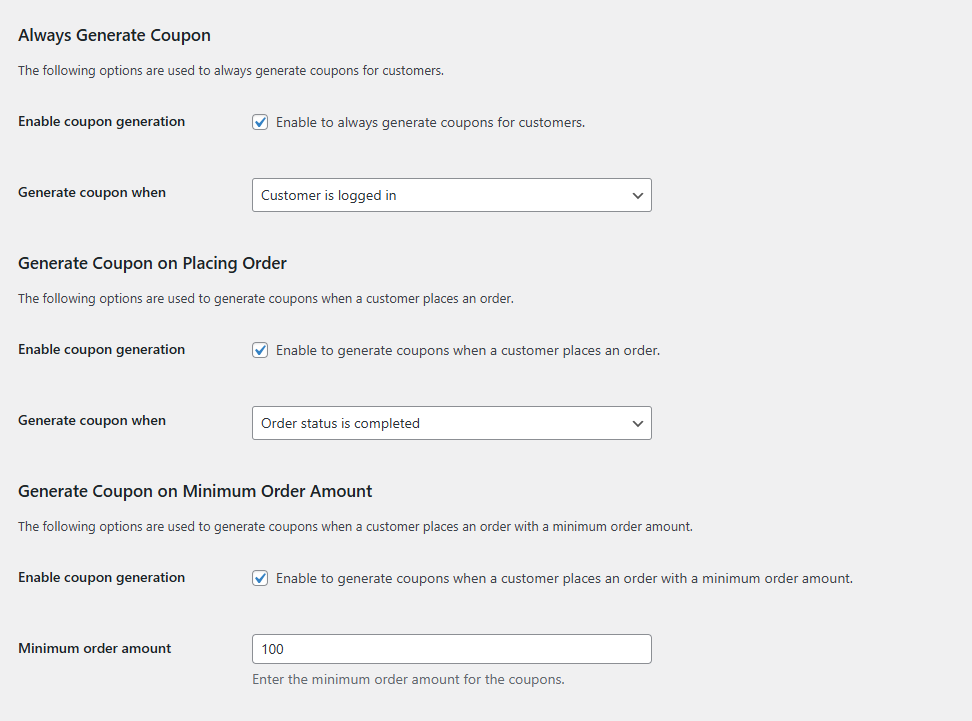
Generation Triggers
Select one or multiple triggers based on your marketing strategy.
Always Generate Coupon
Issue a coupon when customers log in or complete their first order. This ensures every customer receives a reward for engaging with your store.
Generate Coupon on Placing Order
Automatically create a coupon immediately after customers place an order. The coupon is issued once the order status changes to Processing or Completed. This encourages repeat purchases.
Generate Coupon on Minimum Order Amount
Generate coupons only when order totals exceed a specific threshold. Set your minimum amount to reward high-value purchases and encourage customers to spend more.
Save Changes
Click Save Changes to activate your selected coupon generation triggers.