
The General Settings section controls how the WC Donation Manager plugin behaves across your store. These options define how donation products interact with the cart, checkout, and other WooCommerce features, helping you shape a smooth, distraction-free donation process.
Access the General Settings
From your WordPress dashboard, go to Donations → Settings, then open the General tab. This page contains all core configuration options for donation behavior and checkout flow.
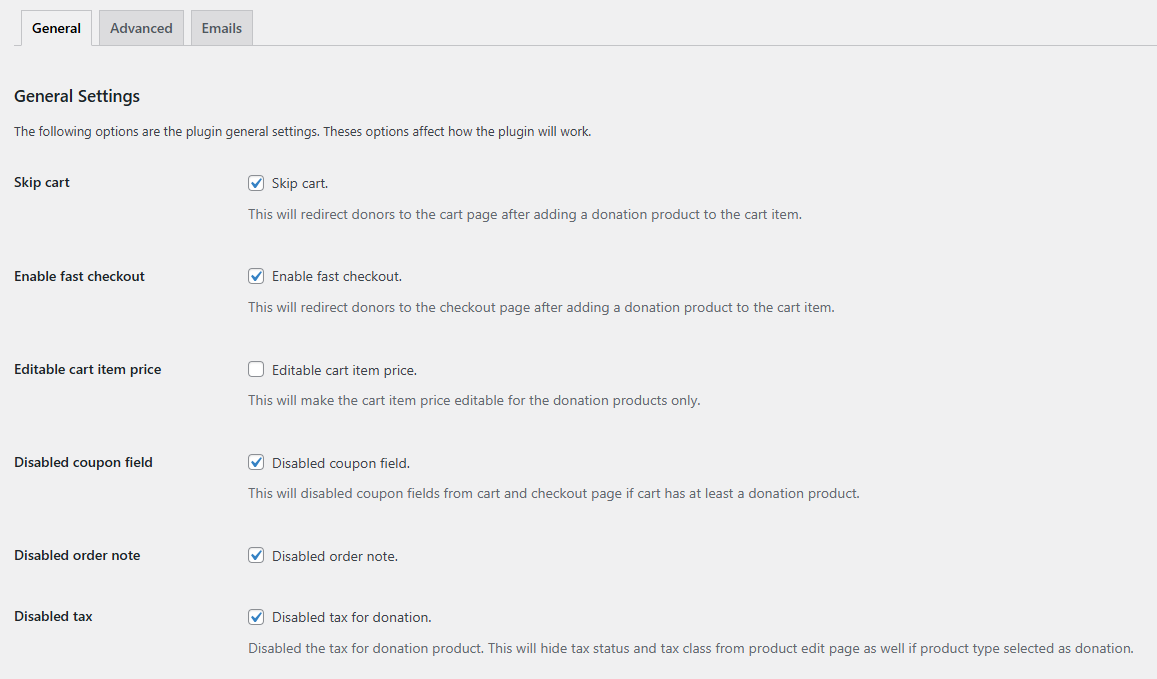
Configure General Options
Each option adjusts a specific part of the donor experience:
- Skip Cart: Redirects donors to the cart page immediately after adding a donation, instead of staying on the product page.
- Enable Fast Checkout: Sends donors straight to the checkout page, skipping the cart entirely for a faster process.
- Editable Cart Item Price: Allows donation amounts to be edited directly from the cart, giving donors control to adjust their contribution. (Applies only to donation products.)
- Disable Coupon Field: Removes the coupon input field on both cart and checkout pages when at least one donation product is present, ensuring discounts aren’t applied to donations.
- Disable Order Note: Hides the order notes field during checkout for donation products, simplifying the form.
- Disable Tax: Treats donation products as tax-exempt items by removing tax options from their settings and excluding them from tax calculations.
Save and Review
After adjusting your preferences, click Save Changes to apply them. The updated settings will take effect immediately and affect how donation products behave in your store.
Next Step
Once you’ve configured the general options, continue refining your setup by learning how to adjust text and button labels. Visit the Customize Labels & Buttons documentation to proceed.